2022
OmniQuest
Turning education into tangible career outcomes.
UI/UX
MOBILE APP (IOS)
About the Brand
OmniQuest is a next-generation e-learning platform built to bridge the gap between learning and employment. It empowers learners not just to upskill through structured courses but also to explore relevant job and internship opportunities directly within the app - turning education into tangible career outcomes.
Project Overview
The OmniQuest project aimed to design a unified platform where education meets opportunity. The goal was to create a smooth learning journey with built-in pathways to employment, allowing users to apply their newly gained skills in real-world roles without leaving the ecosystem. The design needed to maintain clarity, engagement, and trust across both the learning and recruitment experiences.
Project Goal:
The main objective was to create an integrated platform where users could:
Learn new skills through interactive, guided courses.
Access curated job and internship listings that match their completed courses.
Apply directly through the app without friction or third-party redirects.
Track their progress and professional growth within a single dashboard.
Build motivation and confidence through a design that celebrates achievement and progress.
My Role:
I contributed the complete UX and UI design process - from concept and user flow design to interface development and visual identity. My responsibilities included:
Conducting user research and competitive analysis.
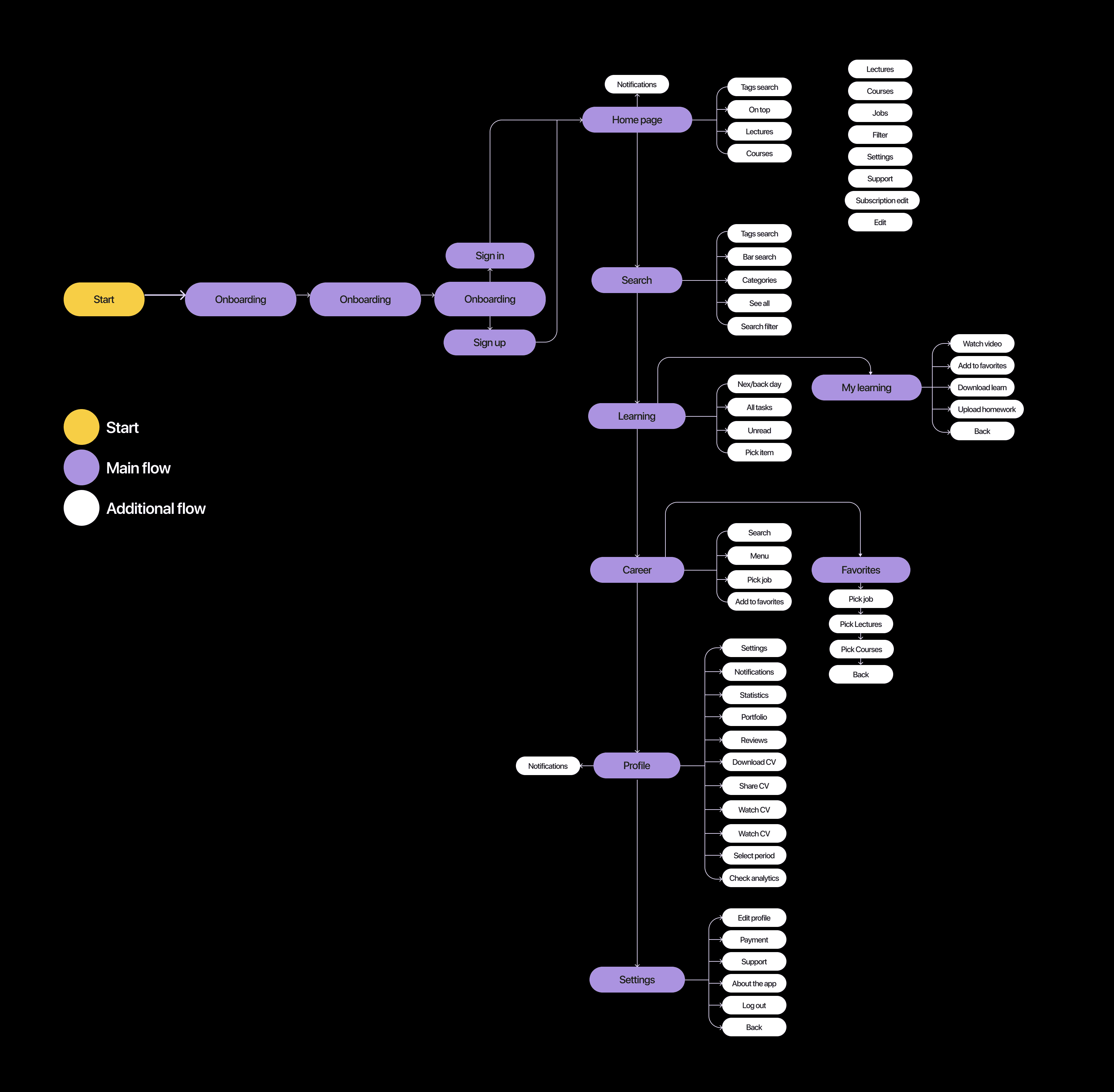
Defining core user journeys and mapping seamless transitions between learning and career modules.
Designing responsive high-fidelity interfaces for mobile and web.
Collaborating with developers to ensure accurate implementation of the interaction logic.
The Challenge
OmniQuest needed to merge two complex experiences- e-learning and job search - into a single, intuitive system. The main challenges were:
Users often struggled to connect their learning outcomes with real-world career opportunities.
The interface risked feeling cluttered due to the dual-purpose nature of the app.
Maintaining consistent motivation and engagement across long learning journeys.
Ensuring job recommendations felt personalized and not random or generic.
Simplifying the application process for users with limited professional experience.
The Approach & Process:
My approach was to focus on continuity - ensuring the user felt guided from the moment they enrolled in a course to when they landed their first job or internship.
Key User Insights:
Users wanted a platform that didn’t just teach but opened real opportunities afterward.
Most learners preferred seeing job recommendations tied directly to completed courses.
Many first-time job seekers valued guidance during the application process.
Visual progress indicators increased motivation and course completion rates.
Overly academic interfaces felt intimidating; users responded better to modern, friendly layouts.
Key Actions:
Journey Mapping: Outlined user flows from learning to job application, identifying emotional drop-off points.
Content Architecture: Designed a clean structure separating "Learn" and "Career" modules while keeping easy navigation between them.
Wireframing & Testing: Created multiple layout iterations tested with learners for clarity and engagement.
Visual System Design: Developed a fresh, youthful visual identity with motivating color cues and clean typography.
Prototype Validation: Conducted usability testing to ensure seamless transitions between course completion and job application steps.
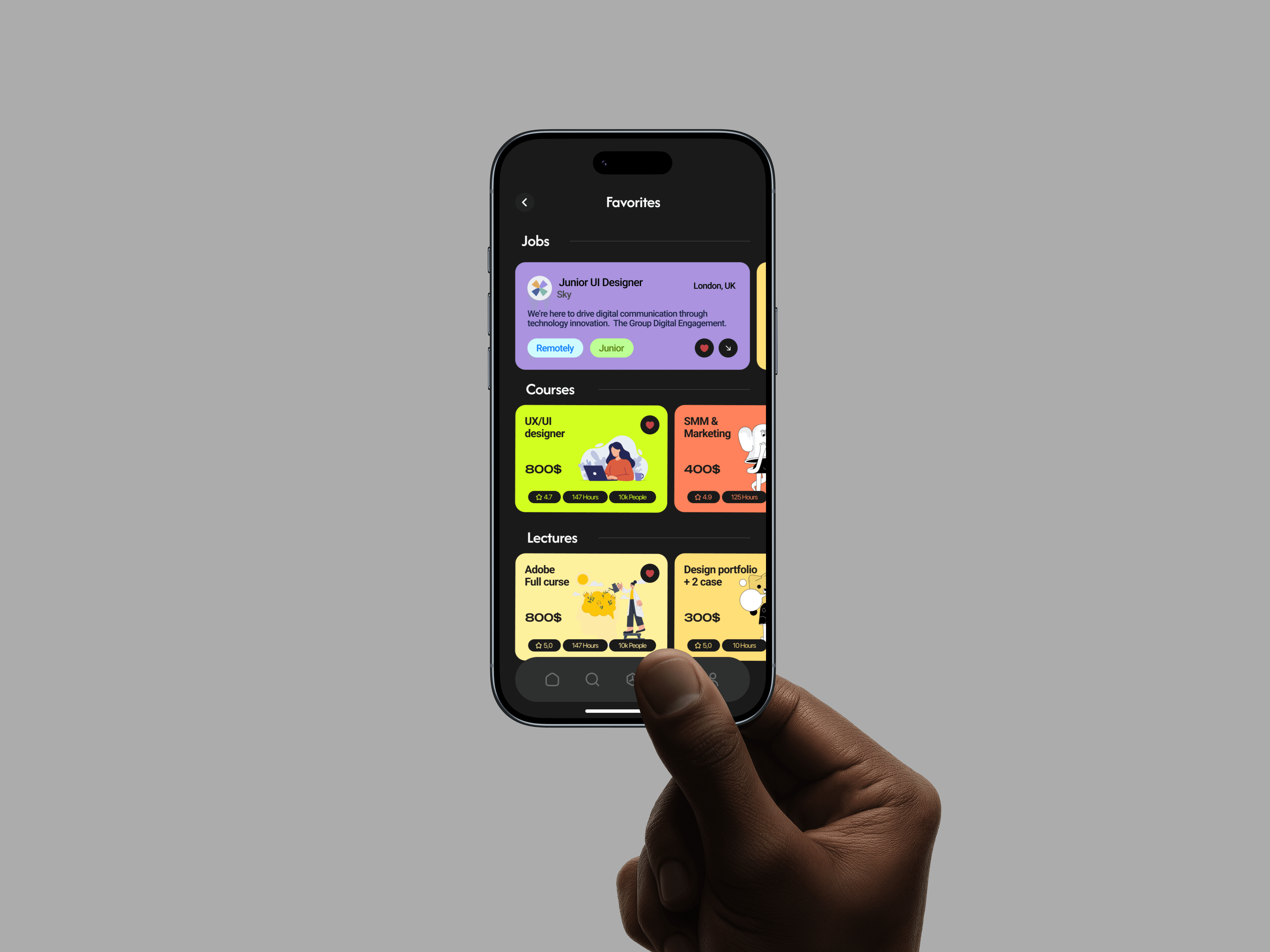
Proposed Solution
I designed a connected platform that transforms learning progress into career opportunity - guiding users from skill development to employment.
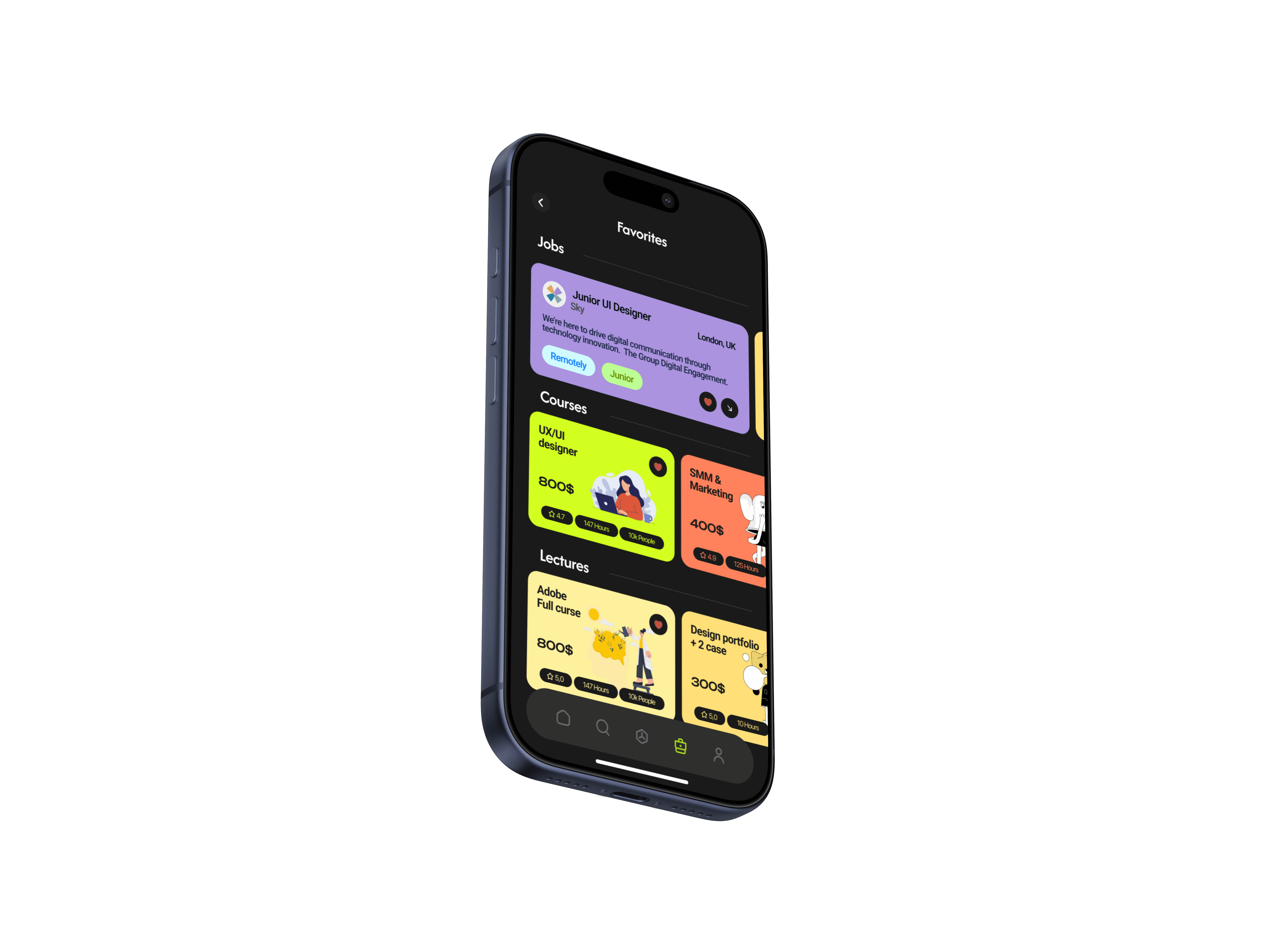
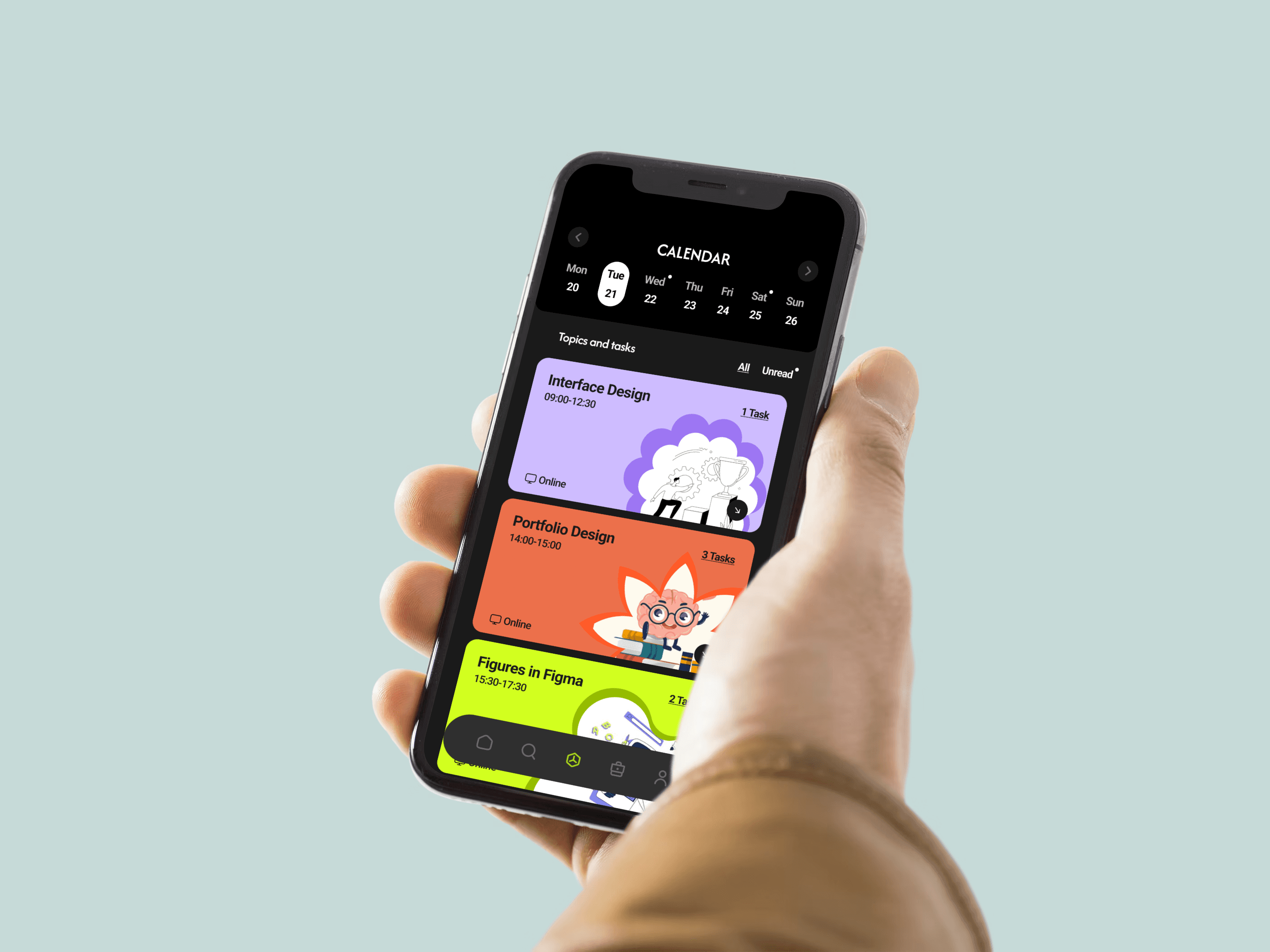
Personalized Dashboard: Centralized course progress, completed certificates, and related job matches for each learner.
Smart Recommendation Engine: Displayed job and internship listings based on users’ finished courses and skill levels.
In-App Application Flow: Enabled users to apply for roles directly within the app, reducing friction and third-party redirection.
Interactive Learning Modules: Designed bite-sized lessons with visual cues and progress tracking to keep motivation high.
Achievement Badges & Certificates: Added milestone visuals to celebrate completion and boost confidence.
Design System Integration: Ensured consistency across the learning and career interfaces using an adaptable component library.
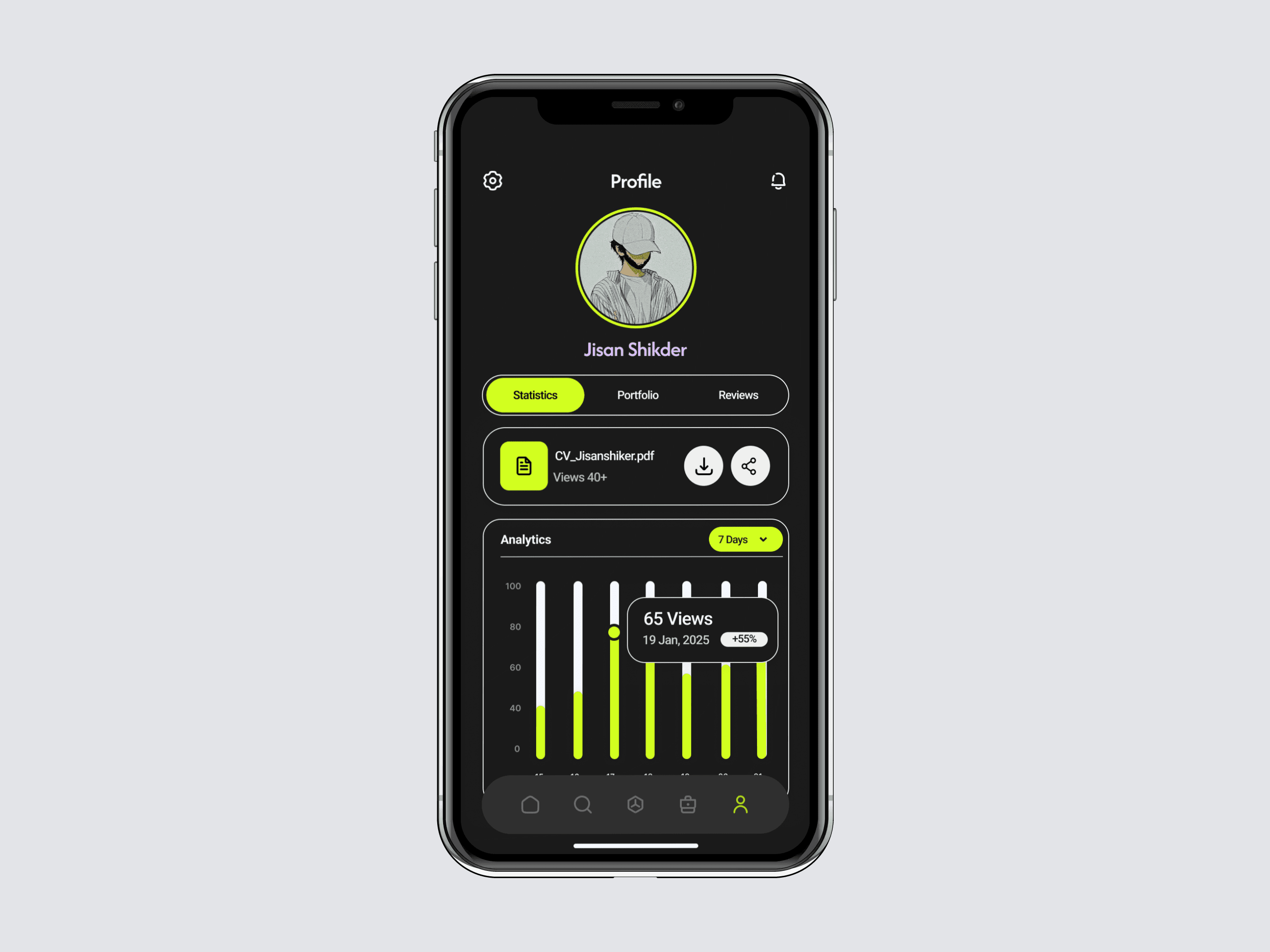
Outcomes
40% increase in course completion rates due to visible job opportunities after finishing courses.
65% of users applied for at least one internship within the first two weeks of completing a course.
Positive feedback highlighted the platform’s “sense of continuity” and “career-first learning approach.”
Learnings
Designing OmniQuest reinforced the value of connecting education to tangible outcomes. I learned that users feel most motivated when they see a clear path from effort to reward - and that UI design can be the bridge that turns learning into opportunity. It also underscored how small interaction details, like progress feedback or one-tap applications, can have a huge emotional and functional impact.
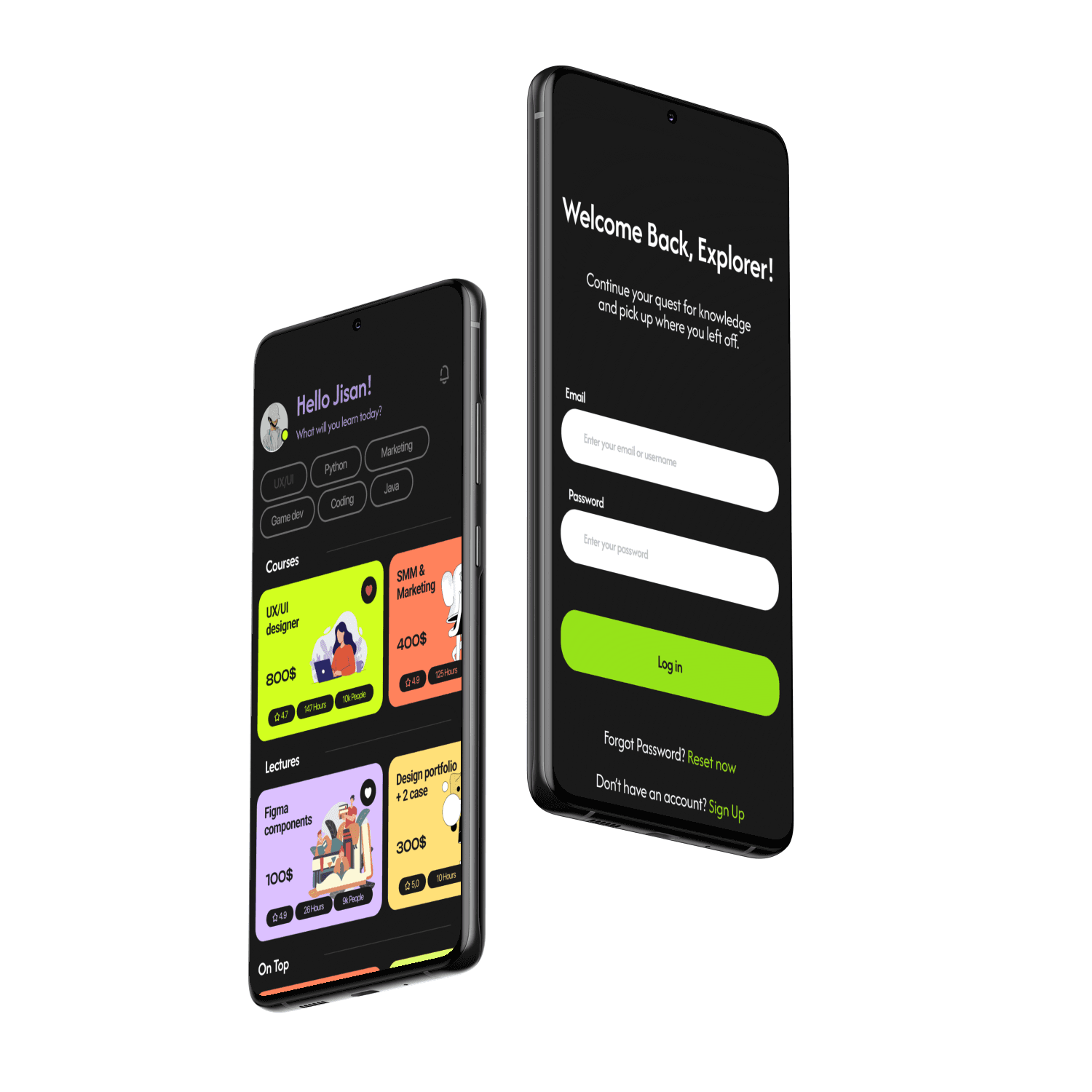
More Works
(HNS® — 02)


FAQ
01
What’s your typical workflow for new projects?
02
How do you determine project timelines?
03
Do you design for both web and mobile?
04
What are your payment terms?
05
Can I update my website or app after launch?
06
Do you only work on fixed projects, or do you offer ongoing support?
07
Can you help with branding too?
08
What file formats will I receive for design handoff?
2022
OmniQuest
Turning education into tangible career outcomes.
UI/UX
MOBILE APP (IOS)
About the Brand
OmniQuest is a next-generation e-learning platform built to bridge the gap between learning and employment. It empowers learners not just to upskill through structured courses but also to explore relevant job and internship opportunities directly within the app - turning education into tangible career outcomes.
Project Overview
The OmniQuest project aimed to design a unified platform where education meets opportunity. The goal was to create a smooth learning journey with built-in pathways to employment, allowing users to apply their newly gained skills in real-world roles without leaving the ecosystem. The design needed to maintain clarity, engagement, and trust across both the learning and recruitment experiences.
Project Goal:
The main objective was to create an integrated platform where users could:
Learn new skills through interactive, guided courses.
Access curated job and internship listings that match their completed courses.
Apply directly through the app without friction or third-party redirects.
Track their progress and professional growth within a single dashboard.
Build motivation and confidence through a design that celebrates achievement and progress.
My Role:
I contributed the complete UX and UI design process - from concept and user flow design to interface development and visual identity. My responsibilities included:
Conducting user research and competitive analysis.
Defining core user journeys and mapping seamless transitions between learning and career modules.
Designing responsive high-fidelity interfaces for mobile and web.
Collaborating with developers to ensure accurate implementation of the interaction logic.
The Challenge
OmniQuest needed to merge two complex experiences- e-learning and job search - into a single, intuitive system. The main challenges were:
Users often struggled to connect their learning outcomes with real-world career opportunities.
The interface risked feeling cluttered due to the dual-purpose nature of the app.
Maintaining consistent motivation and engagement across long learning journeys.
Ensuring job recommendations felt personalized and not random or generic.
Simplifying the application process for users with limited professional experience.
The Approach & Process:
My approach was to focus on continuity - ensuring the user felt guided from the moment they enrolled in a course to when they landed their first job or internship.
Key User Insights:
Users wanted a platform that didn’t just teach but opened real opportunities afterward.
Most learners preferred seeing job recommendations tied directly to completed courses.
Many first-time job seekers valued guidance during the application process.
Visual progress indicators increased motivation and course completion rates.
Overly academic interfaces felt intimidating; users responded better to modern, friendly layouts.
Key Actions:
Journey Mapping: Outlined user flows from learning to job application, identifying emotional drop-off points.
Content Architecture: Designed a clean structure separating "Learn" and "Career" modules while keeping easy navigation between them.
Wireframing & Testing: Created multiple layout iterations tested with learners for clarity and engagement.
Visual System Design: Developed a fresh, youthful visual identity with motivating color cues and clean typography.
Prototype Validation: Conducted usability testing to ensure seamless transitions between course completion and job application steps.
Proposed Solution
I designed a connected platform that transforms learning progress into career opportunity - guiding users from skill development to employment.
Personalized Dashboard: Centralized course progress, completed certificates, and related job matches for each learner.
Smart Recommendation Engine: Displayed job and internship listings based on users’ finished courses and skill levels.
In-App Application Flow: Enabled users to apply for roles directly within the app, reducing friction and third-party redirection.
Interactive Learning Modules: Designed bite-sized lessons with visual cues and progress tracking to keep motivation high.
Achievement Badges & Certificates: Added milestone visuals to celebrate completion and boost confidence.
Design System Integration: Ensured consistency across the learning and career interfaces using an adaptable component library.
Outcomes
40% increase in course completion rates due to visible job opportunities after finishing courses.
65% of users applied for at least one internship within the first two weeks of completing a course.
Positive feedback highlighted the platform’s “sense of continuity” and “career-first learning approach.”
Learnings
Designing OmniQuest reinforced the value of connecting education to tangible outcomes. I learned that users feel most motivated when they see a clear path from effort to reward - and that UI design can be the bridge that turns learning into opportunity. It also underscored how small interaction details, like progress feedback or one-tap applications, can have a huge emotional and functional impact.
More Works
(HNS® — 02)
FAQ
01
What’s your typical workflow for new projects?
02
How do you determine project timelines?
03
Do you design for both web and mobile?
04
What are your payment terms?
05
Can I update my website or app after launch?
06
Do you only work on fixed projects, or do you offer ongoing support?
07
Can you help with branding too?
08
What file formats will I receive for design handoff?
2022
OmniQuest
Turning education into tangible career outcomes.
UI/UX
MOBILE APP (IOS)
About the Brand
OmniQuest is a next-generation e-learning platform built to bridge the gap between learning and employment. It empowers learners not just to upskill through structured courses but also to explore relevant job and internship opportunities directly within the app - turning education into tangible career outcomes.
Project Overview
The OmniQuest project aimed to design a unified platform where education meets opportunity. The goal was to create a smooth learning journey with built-in pathways to employment, allowing users to apply their newly gained skills in real-world roles without leaving the ecosystem. The design needed to maintain clarity, engagement, and trust across both the learning and recruitment experiences.
Project Goal:
The main objective was to create an integrated platform where users could:
Learn new skills through interactive, guided courses.
Access curated job and internship listings that match their completed courses.
Apply directly through the app without friction or third-party redirects.
Track their progress and professional growth within a single dashboard.
Build motivation and confidence through a design that celebrates achievement and progress.
My Role:
I contributed the complete UX and UI design process - from concept and user flow design to interface development and visual identity. My responsibilities included:
Conducting user research and competitive analysis.
Defining core user journeys and mapping seamless transitions between learning and career modules.
Designing responsive high-fidelity interfaces for mobile and web.
Collaborating with developers to ensure accurate implementation of the interaction logic.
The Challenge
OmniQuest needed to merge two complex experiences- e-learning and job search - into a single, intuitive system. The main challenges were:
Users often struggled to connect their learning outcomes with real-world career opportunities.
The interface risked feeling cluttered due to the dual-purpose nature of the app.
Maintaining consistent motivation and engagement across long learning journeys.
Ensuring job recommendations felt personalized and not random or generic.
Simplifying the application process for users with limited professional experience.
The Approach & Process:
My approach was to focus on continuity - ensuring the user felt guided from the moment they enrolled in a course to when they landed their first job or internship.
Key User Insights:
Users wanted a platform that didn’t just teach but opened real opportunities afterward.
Most learners preferred seeing job recommendations tied directly to completed courses.
Many first-time job seekers valued guidance during the application process.
Visual progress indicators increased motivation and course completion rates.
Overly academic interfaces felt intimidating; users responded better to modern, friendly layouts.
Key Actions:
Journey Mapping: Outlined user flows from learning to job application, identifying emotional drop-off points.
Content Architecture: Designed a clean structure separating "Learn" and "Career" modules while keeping easy navigation between them.
Wireframing & Testing: Created multiple layout iterations tested with learners for clarity and engagement.
Visual System Design: Developed a fresh, youthful visual identity with motivating color cues and clean typography.
Prototype Validation: Conducted usability testing to ensure seamless transitions between course completion and job application steps.
Proposed Solution
I designed a connected platform that transforms learning progress into career opportunity - guiding users from skill development to employment.
Personalized Dashboard: Centralized course progress, completed certificates, and related job matches for each learner.
Smart Recommendation Engine: Displayed job and internship listings based on users’ finished courses and skill levels.
In-App Application Flow: Enabled users to apply for roles directly within the app, reducing friction and third-party redirection.
Interactive Learning Modules: Designed bite-sized lessons with visual cues and progress tracking to keep motivation high.
Achievement Badges & Certificates: Added milestone visuals to celebrate completion and boost confidence.
Design System Integration: Ensured consistency across the learning and career interfaces using an adaptable component library.
Outcomes
40% increase in course completion rates due to visible job opportunities after finishing courses.
65% of users applied for at least one internship within the first two weeks of completing a course.
Positive feedback highlighted the platform’s “sense of continuity” and “career-first learning approach.”
Learnings
Designing OmniQuest reinforced the value of connecting education to tangible outcomes. I learned that users feel most motivated when they see a clear path from effort to reward - and that UI design can be the bridge that turns learning into opportunity. It also underscored how small interaction details, like progress feedback or one-tap applications, can have a huge emotional and functional impact.
More Works
FAQ
What’s your typical workflow for new projects?
How do you determine project timelines?
Do you design for both web and mobile?
What are your payment terms?
Can I update my website or app after launch?
Do you only work on fixed projects, or do you offer ongoing support?
Can you help with branding too?
What file formats will I receive for design handoff?